


The affiliate dashboard is separate from your Path customer account. Sign in at Affiliate sign in, then open Affiliate dashboard. Applying and approval are covered in How do I join the Path Affiliate program?.
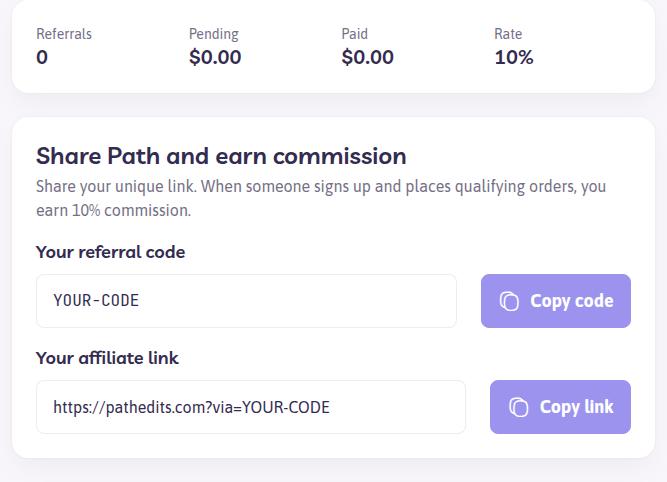
What the dashboard shows
- Referral code and affiliate link — someone who signs up with these is attributed to you
- Coupon codes, when your account has them — customers enter these at checkout. The page says so under the code
- Referrals, pending, and paid totals, and your commission rate
- Referrals — each referred customer, the date they joined, and a status
- Settings — Wise account email for commission payouts
Referral status
| Status | Meaning |
|---|---|
| Pending | Not confirmed yet |
| Confirmed | Qualifying payments can earn commission |
| Rejected | This signup does not earn commission |
Commission is calculated for confirmed referrals on qualifying service orders, paid invoices, and Path credit purchases. A checkout that only uses a coupon, with no confirmed referral on that customer, does not create a commission by itself. The signup still needs your link or referral code.
Older Rewardful records may appear with source Rewardful. Their status on this list is the one Path uses now. If a referral you expected to see as pending is Rejected, contact support from the affiliate account and include the referral you are asking about. Support can explain that row. The dashboard does not reopen a rejected referral from the status filter.
Payouts and sign-in problems
- Open Settings on the affiliate dashboard
- Save the email address on your Wise account
- Payouts send after the hold described in Does Path have an Affiliate Program?, once the approved balance meets the minimum
Affiliate password sign-in always emails a 6-digit confirmation code. A passkey on Affiliate account signs you in without the password and the code. Until email two-factor authentication is on, or you have added a passkey, the dashboard keeps you on that account page. Add a passkey there, or sign out and sign in with your password so Path can email the code.
The affiliate password is not your customer password. If sign-in fails, use Reset affiliate password with the email on the affiliate account. Resetting your Path customer password does not change the affiliate login. Resetting the affiliate password does not turn off the email code.